
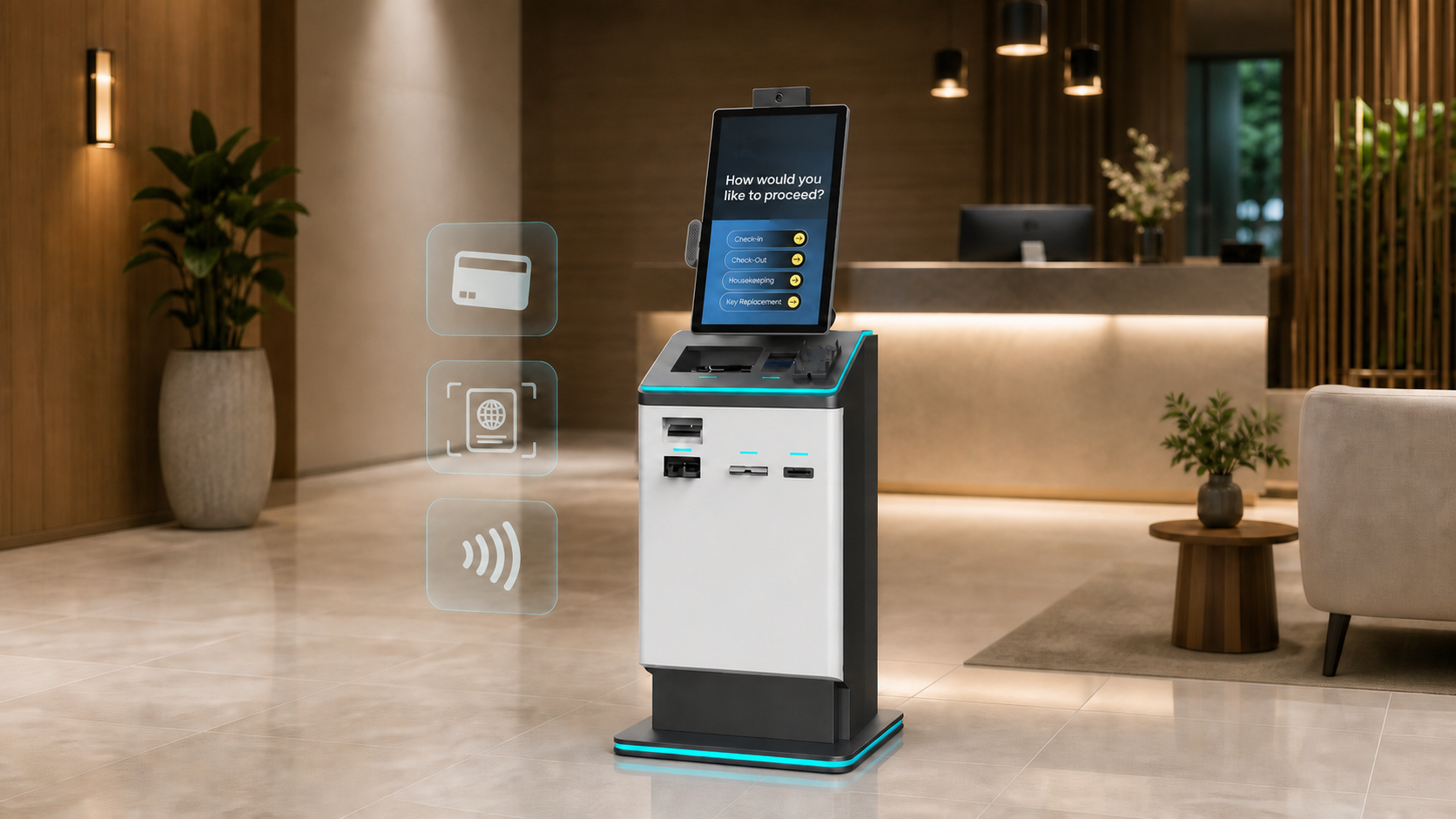
Self Check-in Hotel Kiosk: How to Choose the Right One
Picture a guest arriving at 11 p.m. to a quiet lobby. No one at the desk, no wait, no awkward moments. They walk up to the self check in hotel kiosk, confirm their reservation with a QR code, review their room assignment, and pick up a keycard. Two minutes later, they're in the elevator. That's the practical promise of a well-implemented kiosk check-in system, and it's one that a growing number of hotel operators are delivering right now, not on some future roadmap.
The promise isn't universal, though. Not every kiosk setup delivers that kind of experience, and the gap between a smooth self-service check-in and a guest stranded at a frozen screen at midnight is largely a function of the decisions made before deployment. This article covers how these systems actually work, what the data says about their operational impact, how to match the right format to your property, what the real costs look like in 2026, and what separates a genuinely supported setup from one that leaves guests on their own. Some operators, including those using Kiotel's model, go a step further and pair the kiosk hardware with live virtual agents, so there's always a human available when the technology hits its limits. More on that later.
How a self check-in hotel kiosk actually works
The guest-side experience, from arrival to room key
The guest flow at a modern hotel check-in kiosk is designed to take two to three minutes, not fifteen. A guest approaches the unit, confirms their reservation using a confirmation number, last name, QR code, or ID scan, then reviews their room assignment, signs any required agreements, completes payment if not already captured, and receives a keycard or digital room code. That's the full transaction. Modern systems also surface upsell prompts at this stage (room upgrades, late checkout, F&B packages), which turns a routine arrival moment into a minor revenue opportunity without requiring any staff involvement.
What happens behind the scenes during check-in
The kiosk communicates in real time with the property management system, pulling reservation data, updating room status, and triggering keycard encoding, all without front desk intervention. PMS integration is the make-or-break factor here. A kiosk that syncs cleanly with the hotel's existing system works invisibly; one that doesn't creates mismatched room assignments, failed keycards, and frustrated guests. Oracle OPERA, Cloudbeds, and Mews are among the most widely used PMS platforms in U.S. hotels, and the integration method, whether SOAP-based web services, REST API via Oracle's OHIP platform, or a middleware connector, directly affects how stable and real-time that sync will be. Verify certification status with your PMS vendor before signing any contract.
Payments and ID verification at the kiosk
A contactless check-in kiosk with integrated payment capture runs card-present transactions or pre-authorizations through an embedded PCI-compliant terminal. Some systems also include ID scanning, where a guest's passport or driver's license is read to verify identity and auto-populate guest fields, reducing errors and speeding up the process. Both functions carry compliance obligations. Payment kiosks must meet PCI-DSS requirements for the cardholder data environment, and the payment device itself typically requires PCI PTS/POI certification. Card data should be encrypted at the point of capture and never stored locally on the unit. For ID scanning, treat the captured data as personal information: apply data minimization, set retention limits, and confirm how the vendor stores and transmits it before deployment.
The real numbers: wait times, satisfaction, and staffing impact
Check-in time: from 15 minutes to under 3
Traditional front desk check-in during busy periods runs 10 to 15 minutes. Kiosk check-in consistently lands under three minutes. One hotel group using Mews reported that 30% of guests shifted to kiosk check-in voluntarily, cutting average check-in time by a third and freeing staff for higher-value interactions. Those aren't projections; they're outcomes operators are reporting in 2026. A separate industry survey found that 70% of American travelers said they would skip the front desk entirely for a self-service option if one were available, which tells you a great deal about where guest expectations already sit.
What happens to guest satisfaction scores
Guest satisfaction improvements after kiosk adoption typically land in the 15 to 25% range, based on operator-reported outcomes from hotel technology adoption programs. The key driver isn't just speed, it's perceived control. Guests who check in on their own terms, without depending on staff availability, consistently rate the experience higher than those who wait at a desk. This effect is especially pronounced for late arrivals, extended-stay guests, and travelers who prefer low-friction interactions over conversation.
How kiosks reshape front desk staffing
Hotels commonly report a 30 to 50% reduction in routine front desk task volume after kiosk deployment. That doesn't mean cutting headcount; it means reallocating staff time toward guest issue resolution, concierge support, and housekeeping coordination. The kiosk absorbs the predictable, repetitive work while your team focuses on the exceptions. For overnight shifts in particular, this creates a realistic path to reducing on-site staffing requirements without eliminating the human presence guests expect when something goes wrong.
Matching the kiosk format to your property size
Small independent hotels: when a tablet or mobile-first setup is the smarter choice
For properties under 60 rooms, a full floor-standing kiosk is often more hardware than the property needs. A web-based mobile check-in flow, triggered by a pre-arrival SMS or email, achieves most of the same outcomes at significantly lower cost and complexity. A countertop tablet in the lobby can serve as the on-site fallback for guests who skip the pre-arrival flow. At this scale, the priority is PMS connectivity and ease of setup, not throughput volume. The self check-in kiosk hardware investment should match the guest volume, and for smaller properties, it usually doesn't need to be large.
Mid-size and limited-service hotels: the hybrid approach
For properties in the 60 to 200 room range, including franchise limited-service hotels, a hybrid model works well. Mobile pre-arrival check-in serves as the primary channel, supported by one or two lobby kiosks for walk-in arrivals and guests who prefer to complete the process on-site. This setup handles volume spikes without requiring additional front desk staffing, and it gives the property a consistent check-in experience across both digital and physical touchpoints. The countertop tablet TCO runs considerably lower than a floor-standing unit, which matters when you're evaluating ROI for a single property.
High-volume and full-service properties: where standalone kiosks earn their cost
Larger properties with high daily check-in volume, convention hotels, airport properties, urban full-service hotels, benefit most from dedicated freestanding kiosk units. At this scale, the hotel kiosk system needs to handle multilingual interfaces, loyalty program integrations, keycard encoding, accessible design, and real-time analytics. The throughput justifies the higher hardware cost, and the ROI case is typically clearest at this tier, where even modest reductions in front desk wait times translate directly into measurable satisfaction score improvements.
Features and integrations that separate strong systems from weak ones
PMS integration: the feature that makes or breaks the experience
A kiosk is only as reliable as its connection to the hotel's PMS. The integration needs to be bi-directional and real-time: the kiosk reads reservation data in and writes check-in confirmation, payment records, and room assignments back to the PMS. OPERA Cloud supports REST API integrations via Oracle's OHIP platform; OPERA 5 uses SOAP-based web services through the certified OPERA Kiosk interface. Certified vendors in the OPERA ecosystem include Ariane Systems, Samsotech, P3 Hotel Software, and Canary Technologies, among others. Mews and Cloudbeds have their own integration marketplaces, verify any vendor's specific certification status directly before signing a contract, not after. Robust kiosk check-in software will document its certification clearly and provide references from comparable properties.
Security, compliance, and accessibility requirements
Kiosks processing card payments must operate within a PCI-DSS compliant environment, and the payment device typically needs to meet PCI PTS/POI certification standards. Network segmentation is non-negotiable: the payment terminal should be isolated from guest Wi-Fi, the general hotel network, and any non-payment systems. On the hardware side, tamper-resistant enclosures and regular physical inspection matter for unattended lobby kiosks running around the clock. For ADA compliance, adjustable screen height, accessible touchscreen interfaces, and multilingual UI support aren't optional features, they're requirements for a kiosk serving a general hotel guest population. A unit that fails at 2 a.m. or can't serve a guest with accessibility needs creates exactly the kind of experience the technology was meant to prevent.
What a hotel self check-in kiosk actually costs in 2026
Self check-in kiosk hardware for a standard hotel unit runs $3,000 to $10,000 per unit, with advanced floor-standing models reaching $25,000 or more. Software licensing adds $1,500 to $4,000 per month depending on vendor pricing structure, per-kiosk, per-room, or flat platform fee. Installation and integration setup typically falls between $200 and $2,000. A realistic first-year budget for a single kiosk deployment at a mid-size property lands between $21,200 and $60,000 when all costs are combined. Countertop tablet stations run considerably lower, hardware in the $500 to $2,500 range, with lower ongoing maintenance costs, making them the practical choice for smaller properties evaluating TCO over a three-year horizon.
Annual maintenance contracts typically run $500 to $5,000, often priced at 10 to 20% of hardware cost. The full TCO calculation should also account for software updates, PMS integration maintenance, and ongoing support fees. Multi-property operators often negotiate per-property or multi-unit pricing structures, which reduces the per-location cost meaningfully for regional groups and franchise operators managing several hotels under a shared service model.
Why the kiosk alone often isn't enough, and what smart operators add
Most self-service kiosk vendors sell hardware and software. What they don't solve is the moment when the kiosk can't help: a guest with a non-standard reservation, a payment exception, a room dispute at midnight, or a first-time traveler who simply needs to speak to a person. A self-service hotel kiosk without a human backup plan isn't a complete front desk solution. It's a terminal that can leave guests stranded during the exact moments when support matters most.
This is where Kiotel's model is worth understanding. Rather than selling kiosk hardware alone, Kiotel combines physical front desk kiosk units with 24/7 live virtual receptionists, real agents available via the kiosk screen whenever a guest needs human help. Those agents handle reservation confirmations, payment exceptions, guest questions, and call forwarding without requiring on-site overnight staff. For independent hotels, extended-stay properties, and franchise operators managing multiple locations, this setup delivers genuine 24/7 coverage at a fraction of traditional staffing costs. The kiosk absorbs the routine transaction; the live agent steps in for everything the technology can't resolve on its own.
When comparing vendors, the right question isn't just whether the kiosk works, it's what happens when it doesn't. Ask how the vendor handles exception cases, what the live support path looks like for guests at 2 a.m., and whether the solution scales across multiple properties under a shared pricing structure. A system that pairs kiosk hardware with a live human fallback addresses the full guest journey, not just the smooth check-ins.
Choosing the right system for your property
The right format depends on property size, daily check-in volume, and existing PMS. Smaller properties under 60 rooms get the most value from mobile-first check-in with a countertop tablet as a lobby fallback, low cost, easy to manage, and sufficient for the volume. Mid-size and limited-service hotels benefit from a hybrid mobile-plus-kiosk approach that handles peaks without adding headcount. Larger, high-volume properties make the clearest TCO case for dedicated floor-standing units with full integration, analytics, and multilingual capability built in.
The investment is meaningful, but so is the return: shorter wait times, higher satisfaction scores, and a measurable reduction in routine front desk task volume. What separates a strong implementation from a frustrating one is rarely the hardware itself, it's the human support layer behind it. Evaluate vendors on how the self check in hotel kiosk performs in exception cases and what human fallback they provide. That's the benchmark any solution worth deploying should meet, and the standard Kiotel was built around.